
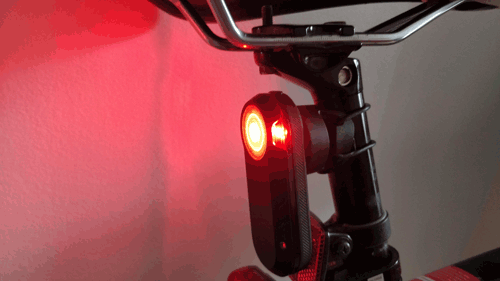
What is a bike radar tail light?
The Garmin Varia RTL510 rear tail light (£119 ) is a dual purpose product.
I’ll call it the “Garmin radar unit” from now on as “Varia RTL510” is a bit of a mouthful. I hope you don’t mind.
First of all it’s an attractive compact powerful rear backlight for your bicycle. You can either have the light constantly on or flashing. If you have it flashing you extend the battery life up to 6 hours.
When you pair it with a small compatible bike computer it becomes a radar unit that detects cars coming from behind you (up to 153 yds /140 m) and shows them as small incoming animated dots on the display coming towards you.
Its a bit like Luke Skywalker’s screen in Star Wars except the incoming X-wing fighters are cars and this time they can actually harm you if you don’t act.
“The Garmin rear tail light is like having a third eye on the back of your head but don’t forget to look over your shoulder”
The good
- A very powerful rear tail light with two modes.
- Extra visibility going around blind corners.
- It makes you feel “safer” on the road specifically cycling alone.
- A new accessory product category for bicycles.
- It may help save your life.
The bad
- A few software bugs, one major, one minor see bugs.
- Not a 100% replacement for looking over your shoulder.
- A bit pricy if you don’t already have a Garmin bike computer to use it with as you need one for it to work.
Set up of unit
A quick tip when setting it up is not to look at the light by angling it downwards on your table top because it is very powerful.
It may leave you with a red image on the back of your retina for a few minutes.
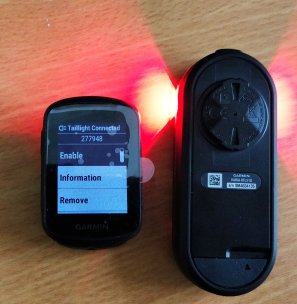
My unit was paired with the Garmin Edge 130 unit (Around £130 at the time of writing). The cost is £130 plus £119 = £249 for both units.
A cheaper bundle below with a cheaper display costs £240 but I’d rather pay an extra £9 and get the brilliant Edge 130 bike computer instead of a display has only one purpose of displaying incoming traffic.
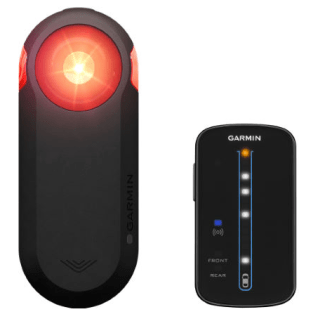
The Garmin Edge 130 has a black and white display.
Other more expensive bike computers have colour displays and can show fast cars as red dots and slow cars as green dots.


On the Garmin Edge 130 computer you and your bike are shown on the display as a triangle icon and the cars coming towards you are shown as round moving icons.
As soon as the car is detected an audio bleep notifies that he is behind you.
If another car comes into range you get another bleep and another dot and so on .
First ride out with the Garmin radar unit
Having quickly clicked both units into place onto the bike I went out for some fun.


The video below is a short one of the radar in action detecting cars.
My impression after the first ride out is below.
Use around dangerous roundabouts
In this dangerous scenario at a roundabout the cars are coming behind me and I don’t know if the car is going to go straight or turn right and avoid me.
For the sake of recording this bit don’t worry I was on the pavement beside the road.
Use when setting off on a ride or after a coffee
Alerting drivers
When approaching cars come close to you the light flashes very quickly to warn them. The video below shows this interaction and I think this is great design.
Some bugs
I found two bugs on the unit. One minor and one major.
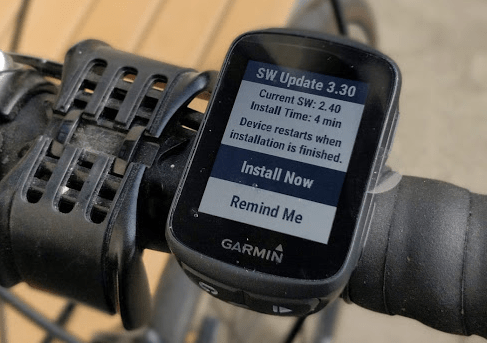
The software tested on the Edge 130 was version 3.30. This was an update to version 2.40 on the device. I couldn’t get the software version of the radar unit as it has no display.
- “B” bug (Annoying but not critical). The unit reported an error called “Sensor error 0.9” whilst cycling along. The error cleared but others are reporting it blaming their bike computers but it appears to be independent of which bike computer you have.
- “A” bug (Critical loss of function). After a stop for a coffee I switched off the radar unit to preserve the battery, kept the Edge 130 on but didn’t stop the ride and brought them both into the coffee shop to avoid theft. I put them both back on and continued my ride however the radar unit failed to reconnect to the Edge 310 leaving me blind to busy traffic on the roads. I had to listen and look over my shoulder. After significant testing by starting and stopping the Edge 130 and switching off and on the radar unit I was unable to reproduce it but others have reported the same bug. This is very disappointing.
whichwearable highlight : Seeing four cars coming at me like racing rabbit dots on the screen for the first time.
whichwearable lowlight : After a coffee the radar unit didn’t reconnect with the computer leaving me “blind” on the road. Hence my comment on always look over your shoulder.
 whichwearable.co.uk