
Summary of testing
Battery optimisation technical design

“Superb”
User experience for battery usage

“Battery modes need to be more intuitive”
Fit for Ultra/Endurance runners

” > 57 hours of fun measured”
Available to buy at Amazon.co.uk and other sites at around £435
It’s not pleasant to run a race and record most of it only for the battery to run out just before you finish. It’s happened to me on a half marathon and you get that sinking feeling of loss and you may say inwardly “Drat!” or the modern day equivalent swear word.
Battery Modes


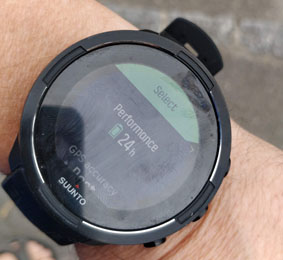
The Suunto 9 multi-sport watch offers three main battery modes (Performance, Endurance and Ultra) that allow you to switch off and on various bits of the device that you may not need e.g. touch screen, vibration etc. to lengthen the battery life. When you think about the principle of “switching off stuff” to save battery life it makes sense. This strategy was used on the Apollo 13 mission to save the lives of the Astronauts.
There is a fourth mode called Custom which allows you to tailor the watch to your needs. You may want to receive notifications from your phone and in that case you may keep Bluetooth on.
Battery mode optimisation allows you the runner to use the watch on one charge if your event lasts more than twenty four hours.
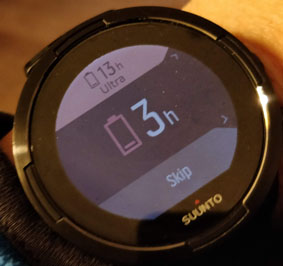
During the run if the battery life is low the watch also offers you to change mode again to extend the battery life for several more hours so you can capture the whole event. See below.
Charging on the move
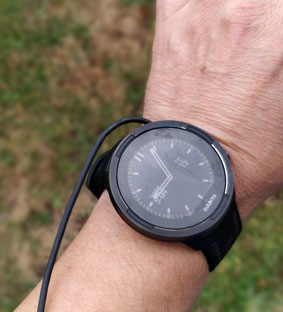
Many “ultra runners” take a large spare battery pack with them and have to charge their watches during their long hour runs (> 24 hours) . The watch is connected with a USB cable up the runner’s arm and down to a back pack on their belt or running vest pocket. They run whilst their watch or device is charging. See below.
The Suunto 9 with battery life optimisation easily passes the twenty four hour milestone on the first setting “Performance” and can during my testing even reached 57 hours in the “Ultra Mode”. Here are the results of “Suunto times verses my recorded times” .
Battery life test results

You can see :
- Performance Mode. For a 24 hour event the Performance mode will deliver what’s needed clocking in at 27 hours.
- Endurance Mode. For a 36 event Endurance is the best option.
- Ultra Mode. For an event lasting more than 50 hours Ultra is the best option but it has limitations :
- Features such as bluetooth are switched off which means that you won’t receive updates and messages from your mates during the race to see where they are.
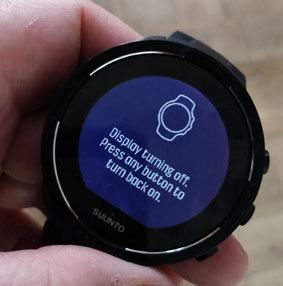
- The screen switches off too so you have to press the side button and scroll quickly through the menus to see your lap times.
- You won’t be able to get your breadcrumb navigation trail in Ultra mode as the screen turns off very quickly ( I measured around 10 seconds).
Battery mode menu is not easy to find
The battery mode selector is not easy to find, it’s hidden which is a real shame. You have to enter the Exercise menu, that is choose to go for a run then choose the battery modes after a long list of menu items. It may be better to have a dedicated “Battery Profile” mode in the next software version.


Pros and Cons of the battery modes
Here are the features which are switched on and off in each mode and the pros and cons.
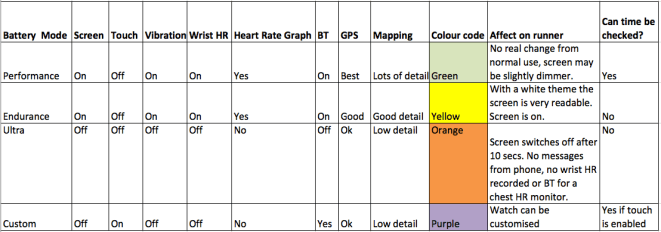
- Suunto recommend that you use Performance mode for the best lock onto GPS. They say that is a risk in Endurance and Ultra modes that the device loses the GPS signal. I did not find this during testing of Endurance mode.
- Custom Mode. The custom mode allows you to decide what to turn on and off.
- Note : With Touch screen off you cannot check the time i.e. the clock time and this is a major limitation of Endurance and Ultra modes. Touch is needed because in order to get the time and remaining battery life percentage you have to double tap the screen. This forces you down the route of using the Custom mode to keep Bluetooth on for messages and Touch on.
Mapping detail in different battery modes
The running routes recorded using the Movescount web app record different details in each mode. For the longer battery life (Endurance and Ultra) there is less detail recorded see below.


More Battery settings
Under the general Settings/Battery saving can be enabled.
The display can be set to toggle also. This turns off the backlight and you need to double tap the screen to switch it on during the day i.e. toggle it on and off.
There is a drawback, whilst recording and exercise running and toggle set to off you can’t check the clock time as it needs to have a double tap to do this. With toggle off you can’t check the time.
Suunto could simply address this by placing the clock time at the top or bottom of one of the data screens so you can.. see the time when in any mode and any backlight combination.
There is another drawback to having Battery saving on, it makes it harder to read. I had to remember to switch the display profile to “light” so that I could read it going along during the day.
For the battery testing I had both Battery saving and toggle on. This gave the watch extra battery life as the backlight was off and battery optimisation was on.
Overall recommendation
- Suunto have done a good job of managing the battery life beyond twenty four hours and this is a great result. They need to improve the user experience to enable users to find the benefits.
- Endurance mode is the best programmed mode and gives you connection to your mobile phone and bluetooth heart rate monitor.
- If you are not happy with not seeing the clock time then tailor the custom mode to have Touch mode on and the same settings as Endurance mode (Except Touch is on not off).
Bug/Issues report
- The watch won’t connect with the Suunto App on a Oneplus 5 and Moto G4 phones. The watch works well with iPhone. Suunto state that Samsung Android phones work well.
- Time and remaining battery life cannot be displayed during Performance, Ultra and Endurance modes.
- The main feature of the phone (Battery life optimisation) is hidden in the phone menus and could benefit from being brought out and made to stand out as the Engineering behind it is superb.
whichwearable highlight : Checking the watch after 50 hours and seeing it still on.
whichwearable lowlight : Having to dig deep to find the menus for battery modes. Once found they are great.
 whichwearable.co.uk