
Test for “Superior quality wireless sound & calls”

This is the “Stretch” test taking a product and seeing how far it can go outside its design.
I brought the Jabra Sport Pulse headset into the office to test with my work PC and mobile phone. At work I use Google Hangouts to make calls and go to video meetings about three or four times a day and an application called Dialpad for VOIP calls. I also listen to music to work on documents to try and drown out the office noise.
I know this product is essentially a Sports product so testing it in the office environment is not what it was designed for.

It was “Cholesterol Month”(wow, wee) so we were invited to ride a knackered out exercise bike, so I did that whilst listening to music using the headphones on my mobile at lunch time. Hey it was better than nothing.
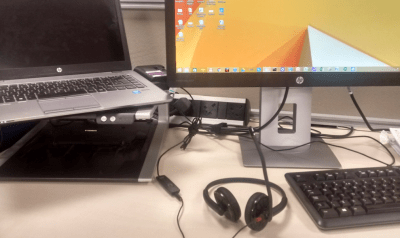
Pairing and using with a Windows 8.1 Laptop for VOIP calls
I had trouble with the Windows 8.1 PC as I could listen to music but couldn’t make calls on VOIP, Hangouts or Dialpad as the PC driver didn’t recognise the microphone. I played around and got the mic to pick up with a different Windows setting.
Mac Pairing and Skype
The device was paired with a 15 inch Mac at home to test with the Mac.Using the Mac was great and I noticed that the mic was recognised immediately. I made a successful call to Skype and my voice was recorded so no Mic or driver issues on Mac.
Pairing feedback with more than one device is also great as the Jabra tells you ” 2 devices connected”. Imagine if it went further and told you which device it connected to? Perhaps that’s one for the Bluetooth Forum as we connect to multiple devices. Which device am I connected to now?
iPhone 6 and Moto G Pairing and Performance
I also paired the headset with an iPhone 6 and the Moto G to compare the Multi-Function Button (MFB) that sits in the middle of the Volume Up and Volume down plastic unit which hangs beautifully below the right earpiece.
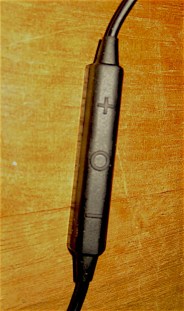
With the Moto G pressing the MFB starts and stops the Music. With the iPhone 6 Siri is initiated which what I want when I’m running as I don’t want to call the last number dialled. Imagine when running saying “Call home” or “What time is Crimewatch on tonight?” instead of being limited to calling functions on Android. When you pair the iPhone it prompts you to download the Sports App, a nice touch in user experience. With the Moto G Smartphone call quality was very good and basic functions like answering calls and last number redial worked very well. There is a tendency to hit the last number redial after workouts too easily and I called my local Indian restaurant about three times by mistake. An improvement to design would be to make the button sit the other side of the volume UP and Down keys to avoid hitting it instead of the volume keys. I have noticed that the + o – layout of other devices MFB is the same as this design, again I question if this layout can be improved whilst running. Remember you cannot see it whilst running.
whichwearable Highlight : Fantastic management of multiple Bluetooth connections across many devices. Great Music sound and call audio on Mac and Mobile. Some noise reduction in a noisy office with the foam ear inserts.
whichwearable Lowlight : Failure of the Windows 8 driver to allow the mic to work for VOIP and Video calls initially.
 whichwearable.co.uk